
Share Blood Pressure Readings With Doctor: Complete Guide
November 25, 2026
TL;DR
Sharing blood pressure readings with your doctor means providing home measurements so your care team can spot patterns, adjust medications, and catch conditions like white coat hypertension. You can share via paper logs, patient portals, Bluetooth-connected monitors, or remote patient monitoring systems. The key is following a consistent measurement protocol (two readings, one minute apart, twice daily for seven days) and choosing a sharing method your doctor’s office can actually work with.
Nearly half of all adults in the United States have high blood pressure. Yet the readings taken during a brief office visit only capture a snapshot, not the full picture. That gap between what happens in the exam room and what happens at home is exactly why learning to share blood pressure readings with your doctor matters so much.
This guide covers what the practice means, why it changes clinical outcomes, every method for getting your numbers to your care team, and the mistakes that trip people up.
How Do You Share Blood Pressure Readings With Your Doctor?
You can share blood pressure readings with your doctor through a paper blood pressure log, a secure patient portal, a photo of your measurement record, a Bluetooth-connected blood pressure monitor app, or a remote patient monitoring program. Record your systolic pressure, diastolic pressure, pulse, date, and measurement time. For a useful home blood pressure record, take two readings one minute apart during each measurement session and follow your doctor's instructions on how many days to monitor. Your doctor can review the results to identify patterns, evaluate medication effectiveness, and determine whether further treatment or monitoring is needed.
What Does “Sharing Blood Pressure Readings with Your Doctor” Actually Mean?
The term refers to providing your physician or care team with blood pressure measurements taken outside a clinical setting, typically at home, so they can make informed treatment decisions between office visits.
The formal clinical name is self-measured blood pressure (SMBP) monitoring. National and international guidelines recognize SMBP as a validated approach for out-of-office blood pressure measurement. But measurement alone is only half the equation. SMBP becomes most effective when readings are shared with the care team so that medications and lifestyle plans can be adjusted based on real-world data.
A few terms worth knowing:
Systolic pressure (the top number): the force while your heart beats.
Diastolic pressure (the bottom number): the force while your heart rests between beats.
mmHg: millimeters of mercury, the standard unit for blood pressure readings.
BP log: a written or digital record of your readings over time.
RPM: remote patient monitoring, where readings flow automatically from a device to your provider’s system.
Whether you jot numbers on paper or use a connected blood pressure monitor, the goal is the same: give your doctor the data they need to manage your health between visits.
Why Sharing Home Blood Pressure Readings Matters
White Coat Hypertension Is More Common Than You Think
About one in five people has white coat hypertension, meaning their blood pressure reads high in the doctor’s office but is normal at home. One analysis tied to European Society of Cardiology guidelines found that white coat hypertension accounted for around 29% of patients whose office readings were elevated. Without home data, these patients risk being overtreated with medications they don’t need.
Masked Hypertension Is the Hidden Danger
The reverse problem is equally serious. Masked hypertension means blood pressure appears normal in the clinic but runs high at home. This is the dangerous one, because it produces reassurance instead of treatment. Only regular home monitoring, shared with your provider, reveals it.
Patterns Beat Snapshots
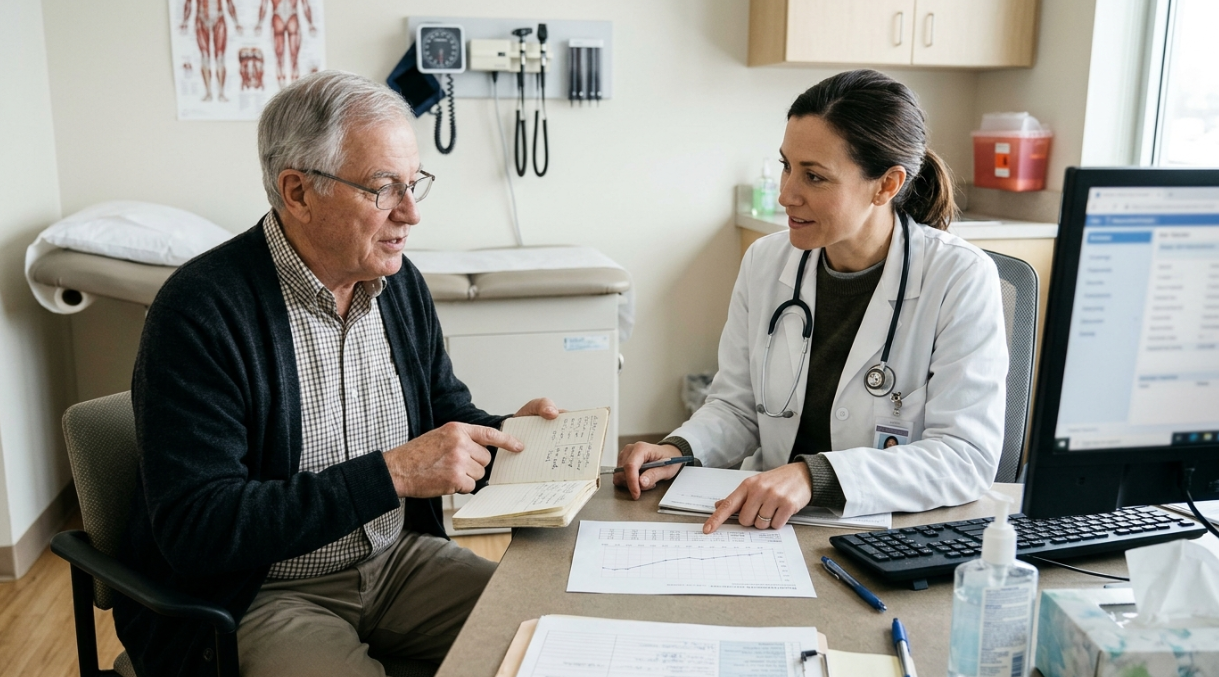
What your doctor wants is the pattern. A week or two of readings taken calmly at home, at the same times each day, tells them far more than any single number can. Home readings show how your blood pressure behaves during normal routines, how medications are working, and whether lifestyle changes are making a difference.
The Clinical Evidence Is Strong
A 2024 study of the DIG IT remote monitoring program published findings that are hard to ignore. Patients in the program saw their systolic blood pressure drop by an average of 31 points, compared to just 15 points in the control group. Diastolic pressure decreased by 11 points versus 5 in standard care.
Separately, a longitudinal study of 5,520 stage-2 hypertension patients across 39 clinics showed average reductions of 14.1/8.0 mmHg at 24 months when home monitoring was combined with clinical support through a remote patient monitoring program.
These results point to one conclusion: sharing home readings with your doctor isn’t just a nice-to-have. It directly improves outcomes.
Patients managing both blood pressure and blood sugar may benefit from monitoring multiple vital signs. A blood pressure and glucose monitor bundle can simplify tracking for people with common comorbidities like diabetes and hypertension.
Blood Pressure Categories: Know Your Numbers
The 2025 AHA/ACC guidelines define four categories:
Category |
Systolic (mmHg) |
Diastolic (mmHg) |
|---|---|---|
Normal |
Less than 120 |
Less than 80 |
Elevated |
120 to 129 |
Less than 80 |
Stage 1 Hypertension |
130 to 139 |
80 to 89 |
Stage 2 Hypertension |
140 or higher |
90 or higher |
Why Home and Office Blood Pressure Thresholds Can Differ
Blood pressure readings taken at home and in a medical office do not always use identical diagnostic thresholds. The appropriate comparison depends on the office blood pressure level being evaluated.
Under the 2025 AHA/ACC guideline, a home blood pressure average of 130/80 mmHg corresponds to an office level of 130/80 mmHg. However, an office reading of 140/90 mmHg corresponds to a home monitoring threshold of approximately 135/85 mmHg.
This distinction matters because home monitoring helps healthcare professionals confirm hypertension, identify white coat hypertension, and detect masked hypertension.
Do not use a single home reading to diagnose yourself or change your medication. Your doctor should interpret your average readings using the appropriate clinical thresholds and your overall health history.
How to Measure Correctly Before You Share
Garbage in, garbage out. If your measurement technique is inconsistent, the readings you share with your doctor won’t be useful. Here’s the protocol physicians expect, based on AHA and AMA guidance.
The Standard Home Blood Pressure Monitoring Protocol
A commonly used home blood pressure monitoring protocol involves taking two readings in the morning and two in the evening, with one minute between readings, for seven consecutive days.
This produces:
2 measurement sessions per day.
14 measurement sessions over seven days.
2 readings during each session.
28 individual blood pressure readings in total.
Some clinical protocols recommend excluding the first day's readings when calculating the average. If your doctor follows this approach, the remaining six days provide 24 individual readings.
Follow your healthcare professional's instructions because monitoring schedules and averaging methods can differ depending on your condition and treatment plan.
Proper Technique
Sit quietly for 5 minutes before measuring. No talking, no phone.
Feet flat on the floor, back supported, legs uncrossed.
Arm supported at heart height on a table or armrest.
Use the correct cuff size. A cuff that’s too small gives falsely high readings. If you need a different size, a replacement cuff can make a real difference in accuracy.
Empty your bladder first. A full bladder can raise systolic pressure by 10 to 15 points.
Avoid caffeine, exercise, and smoking for 30 minutes before measuring.
What to Record
For each measurement, log the date, time, systolic number, diastolic number, and pulse (if your monitor displays it). Add a notes column for anything unusual: missed medication dose, stressful event, illness, heavy exercise, or a change in diet. These contextual details help your doctor interpret outliers rather than react to them.
Blood Pressure Log Template: What to Send Your Doctor
Use this simple blood pressure log to organize your home measurements before sharing them with your healthcare professional.
Date |
Time |
Reading 1 (SYS/DIA) |
Reading 2 (SYS/DIA) |
Pulse |
Notes |
|---|---|---|---|---|---|
Day 1 |
Morning |
||||
Day 1 |
Evening |
||||
Day 2 |
Morning |
||||
Day 2 |
Evening |
||||
Day 3 |
Morning |
||||
Day 3 |
Evening |
||||
Day 4 |
Morning |
||||
Day 4 |
Evening |
||||
Day 5 |
Morning |
||||
Day 5 |
Evening |
||||
Day 6 |
Morning |
||||
Day 6 |
Evening |
||||
Day 7 |
Morning |
||||
Day 7 |
Evening |
Information to include with your blood pressure log:
Patient name or identifier, if requested by the clinic.
Name and model of the blood pressure monitor.
Cuff type and size.
Current blood pressure medications and dosage.
Dates covered by the monitoring period.
Any unusual symptoms or circumstances.
Tip: Record both readings, even when the first and second measurements are different. Your doctor can decide how to calculate and interpret the average.
Six Methods for Sharing Blood Pressure Readings with Your Doctor
There’s no single “right” way. The best method is the one your doctor’s office can actually receive and use. Here are all six approaches, from low-tech to fully automated.
Best Ways to Share Blood Pressure Readings With Your Doctor
The best way to share blood pressure readings depends on your doctor's communication system, your comfort with technology, and how frequently your readings need to be reviewed.
Sharing Method |
How It Works |
Main Advantage |
Potential Limitation |
|---|---|---|---|
Paper blood pressure log |
Record readings manually and bring them to appointments |
Simple and inexpensive |
Requires manual recording |
Photo of your log |
Photograph handwritten readings and upload them |
Convenient for existing paper records |
Handwriting may be difficult to read |
Phone or voicemail |
Call the clinic and provide your readings |
Useful for patients without digital access |
Not every clinic accepts phone reports |
Patient portal |
Enter readings or upload a report through your provider's portal |
Keeps information within the provider's communication system |
Features vary by healthcare organization |
Bluetooth monitor app |
Automatically sync readings to a smartphone app |
Reduces manual data entry |
Requires a compatible device and smartphone |
Remote patient monitoring |
A connected device transmits readings to the care team |
Supports ongoing monitoring between visits |
Availability and eligibility depend on the provider and program |
Which method should you choose?
For occasional monitoring, a paper log or patient portal may be sufficient. If you measure your blood pressure frequently, a Bluetooth-connected monitor can make tracking easier. Patients who need regular clinical oversight may benefit from a remote patient monitoring program when their healthcare provider offers one.
1. Paper Log or Printed Diary
Still the most common method. The AHA provides printable logs with columns for date, time, systolic, diastolic, pulse, and notes. You fill it out by hand and bring it to your appointment.
Pros: Simple, no technology required, universally accepted.
Cons: Easy to lose before appointments. Practitioners on Reddit note that older patients frequently misplace paper logs between visits, creating gaps in their data.
2. Photo of Your Log
Take a photo of your handwritten log and send it to your clinic through a secure messaging system, or simply show it at your next visit. This is a surprisingly popular low-tech workaround, especially for patients who are less comfortable with apps.
3. Phone or Voicemail
Some clinics accept readings called in by phone. As one AMA source put it, for health systems that don’t have an automated way of getting blood pressure into the electronic medical record, patients may call in their readings or bring in their sheet of paper.
4. Patient Portal (MyChart, etc.)
Many health systems now let patients enter home readings directly into their patient portal. If your provider uses MyChart or a similar system, look for a “Track My Health” or “Flowsheets” feature. This gets your data into the same record your doctor reviews during appointments.
5. Bluetooth Monitor with App Export
Connected monitors sync readings over Bluetooth to a companion app, which can then generate PDF, CSV, or XLS reports for sharing. This is the method that gets the most discussion in online communities, and for good reason: it eliminates manual transcription errors and produces clean trend data.
That said, users on Reddit’s r/bloodpressure and r/hypertension forums regularly report that Bluetooth pairing failures are the number one complaint across all connected monitors. One user mentioned that their nephrologist wanted values in a specific form format, making generic PDF exports inadequate. The practical takeaway: before investing in a connected monitor workflow, ask your doctor’s office what format they prefer.
For a monitor that pairs over Bluetooth and syncs to the iHealth MyVitals app, the iHealth Ease wireless monitor offers a budget-friendly entry point for connected blood pressure tracking.
6. Automatic Remote Patient Monitoring (RPM)
In RPM programs, patients are given connected devices that automatically transmit readings to the clinic’s electronic health record. The care team monitors data in real time and responds to elevated readings without waiting for a scheduled visit.
Research shows that this kind of integrated data visualization offers more meaning about hypertension for patients, and that direct integration of home blood pressure into clinical workflow drives greater patient engagement in hypertension management decisions.
A practical access point: as of February 2024, 42 state Medicaid programs cover SMBP devices, which means eligible patients in most states can get a connected monitor at low or no cost through their insurance.
A Note on Security
Avoid sending blood pressure data through standard SMS or unsecured email. Use your clinic’s patient portal, a HIPAA-aligned app, or a secure messaging system. If you’re unsure, ask your provider’s office which channels they consider secure.
How to Send Blood Pressure Readings to Your Doctor: Step by Step
Sending home blood pressure readings to your doctor is straightforward when you prepare the information in advance. The exact process depends on your healthcare provider's communication system.
Step 1: Collect Your Blood Pressure Measurements
Record your readings consistently over the monitoring period recommended by your doctor. Include both systolic and diastolic pressure, the date, time, and pulse if available.
Avoid sending only your highest or lowest readings. Your doctor needs the complete record to understand your blood pressure patterns.
Step 2: Choose a Sharing Method
Ask your doctor's office whether it accepts readings through a patient portal, secure email, printed log, mobile app, or remote monitoring program.
If your provider has a preferred format, use it rather than sending an unsupported file type.
Step 3: Organize Your Readings
Arrange your measurements chronologically. Include morning and evening readings separately and add notes about missed medication doses, illness, unusual stress, or other relevant circumstances.
If you use a connected monitor, check that the exported report includes the measurement dates and times.
Step 4: Send Your Record Securely
Upload your readings through the patient portal or another communication channel approved by your healthcare provider.
If your clinic accepts paper records, bring the log to your appointment. For telehealth consultations, ask whether the information should be submitted before the appointment.
Step 5: Confirm That Your Doctor Received the Information
If you submit readings electronically, check whether the portal confirms successful submission. If you do not receive confirmation or your readings need urgent attention, contact the clinic directly.
Step 6: Follow Your Doctor's Recommendations
Your healthcare professional may recommend continuing home monitoring, adjusting your treatment plan, or scheduling another appointment.
Keep recording your blood pressure according to the recommended schedule, even after sending the initial report.
What Information Should You Send Your Doctor With Blood Pressure Readings?
When sharing home blood pressure measurements, provide enough information for your healthcare professional to evaluate your readings accurately. Numbers without dates, measurement times, and relevant context may be difficult to interpret.
Here are the most important details to include.
1. Systolic and Diastolic Blood Pressure
Record both numbers from every measurement.
Systolic pressure is the upper number and represents the pressure in your arteries when your heart beats. Diastolic pressure is the lower number and represents the pressure when your heart rests between beats.
For example, a reading of 128/82 mmHg means a systolic pressure of 128 and a diastolic pressure of 82.
2. Date and Time of Each Measurement
Include the date and exact time of every reading. This helps your doctor identify differences between morning and evening measurements.
3. Pulse Rate
If your monitor displays your pulse, include it in your record. Pulse information provides additional context about your heart rate during measurement.
4. Medication Information
Include the names and dosages of your blood pressure medications, along with any missed doses or recent changes.
This helps your doctor evaluate whether your treatment is working as expected.
5. Relevant Symptoms and Circumstances
Add notes about unusual symptoms, illness, stress, medication changes, or other circumstances that might affect your readings.
6. Blood Pressure Monitor Information
Tell your doctor the brand and model of your device, whether it uses an upper-arm or wrist cuff, and the cuff size.
Your healthcare professional can check whether the device is validated and whether the cuff fits correctly.
Providing these details gives your doctor a more complete picture of your home blood pressure measurements and makes it easier to identify patterns that may require further evaluation.
How to Choose an Accurate Blood Pressure Monitor for Home Sharing
A blood pressure monitor should provide reliable measurements before its readings are shared with a healthcare professional. Bluetooth connectivity, mobile app compatibility, and automatic data synchronization are useful features, but they do not independently establish measurement accuracy.
When choosing a home blood pressure monitor, consider the following factors.
Choose a Clinically Validated Device
Look for an automatic upper-arm blood pressure monitor that has been validated against an accepted clinical standard.
In the United States, the American Heart Association recommends using validated upper-arm cuff-style monitors. Resources such as ValidateBP can help patients identify devices that have undergone independent validation.
Select the Correct Cuff Size
An incorrectly sized cuff can produce inaccurate measurements. Check the manufacturer's recommended arm circumference range before purchasing a monitor.
Check Memory and Data Export Features
If you regularly share readings with your doctor, look for a device that stores previous measurements and provides a way to review or export them.
Useful features include:
On-device measurement memory.
Bluetooth synchronization.
Daily and weekly trend reports.
PDF or spreadsheet exports, where available.
Multiple user profiles.
Integration with supported health applications.
Ask Your Doctor Whether the Device Is Suitable
Bring your monitor to an appointment so your healthcare professional can review your technique, cuff fit, and device accuracy.
A connected device can make tracking more convenient, but accurate measurement and consistent recording remain the most important requirements.
Connected Monitors and Apps That Simplify Sharing
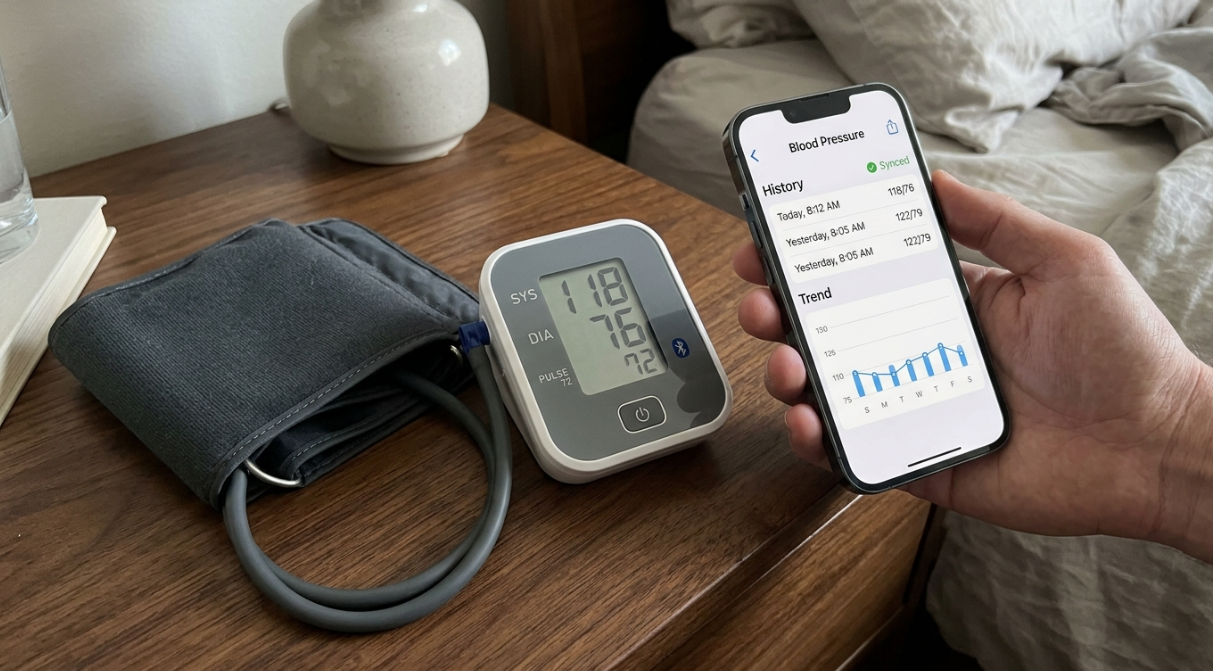
The workflow for a Bluetooth blood pressure monitor looks like this: measure → sync to app → store → review trends → export or share a report.
When evaluating a connected monitor and app combination, look for these features:
PDF report generation so you can email or print a summary
Trend graphs that show blood pressure over weeks or months
Export options (CSV, XLS, or PDF) for flexibility
Apple Health or Health Connect integration so readings appear alongside other vital signs
Multi-user support if a caregiver is managing readings for a family member
The iHealth Track Pro includes a cuff-wrap indicator and advanced signal-analysis algorithm, plus Bluetooth 5.2 connectivity and app synchronization through the iHealth MyVitals app. For users who prefer a wrist-based option, the iHealth Push wrist monitor offers Bluetooth connectivity in a more portable form factor, though upper-arm monitors are generally considered more accurate by clinical guidelines.
Caregiver Considerations
Caregivers managing blood pressure monitoring for an elderly parent or family member face unique challenges. They often need multi-user device support so they can track their own readings alongside those of the person they’re caring for. They may also need to share data with multiple providers, maintain readings across different locations, and troubleshoot technology on someone else’s behalf.
If you’re a caregiver, look for monitors that support at least two user profiles and apps that allow you to manage separate accounts. Having readings stored on the device itself (not just in the app) provides a backup if Bluetooth connectivity is unreliable at the patient’s home.
Pre-Visit Blood Pressure Checklist
Before your next appointment, whether in person or via telehealth, run through this checklist:
Measured twice daily (morning and evening) for at least 7 days
Took two readings, one minute apart, at each session
Recorded date, time, systolic, diastolic, and pulse for each reading
Added notes for missed medications, unusual stress, illness, or exercise
Confirmed the sharing format your doctor’s office prefers
Prepared a printed log, exported PDF, or entered data into the patient portal
Brought your monitor to the visit so staff can compare it against their office device (recommended annually)
For telehealth visits, pre-visit data sharing is critical. There’s no cuff in the room during a video call, so your doctor depends entirely on the readings you provide beforehand.
When to Contact Your Doctor About High Blood Pressure Readings
Some blood pressure readings require prompt medical attention rather than waiting for your next scheduled appointment.
Blood Pressure Above 180/120 mmHg
If your blood pressure reading is higher than 180/120 mmHg:
Wait at least one minute.
Take another blood pressure reading.
If the second reading remains this high, contact your healthcare professional immediately for instructions.
Do not ignore a persistently severe reading, even if you feel normal.
When to Call Emergency Services
If your blood pressure is higher than 180/120 mmHg and you experience symptoms such as the following, call 911 immediately:
Chest pain
Shortness of breath
Back pain
Numbness or weakness
Changes in vision
Difficulty speaking
These symptoms may indicate a hypertensive emergency. Do not wait for another appointment or attempt to manage the situation by changing medication yourself.
What If Your Readings Are Consistently Elevated?
Contact your healthcare professional if your home readings repeatedly exceed your recommended target, even when they are below 180/120 mmHg.
Your doctor can determine whether you need additional monitoring, medication adjustments, or an earlier appointment.
Never stop or change prescribed blood pressure medication based solely on home readings without consulting your healthcare professional.
Frequently Asked Questions
How many days of readings should I share with my doctor?
The standard recommendation is seven consecutive days of twice-daily measurements (morning and evening), with two readings taken one minute apart at each session. Some clinicians prefer 14 days. When in doubt, ask your specific provider.
What if my home readings are different from my doctor’s office readings?
This is common and clinically important. If your office readings run consistently higher, you may have white coat hypertension. If they run lower, masked hypertension is a possibility. Share your home log so your doctor can compare and determine which pattern applies to you. Remember that the diagnostic threshold for home readings (135/85) differs from the office threshold (130/80).
Can I use a wrist blood pressure monitor to share readings?
Most clinical guidelines recommend upper-arm monitors because they tend to be more accurate. However, wrist monitors can be appropriate for people whose arm circumference makes a standard or large cuff impractical. If you use a wrist monitor, keep your wrist at heart level during measurement and tell your doctor which type of device you’re using.
Is my data private when I share through an app?
Reputable health apps follow HIPAA-aligned practices for data handling. Avoid sending readings through unsecured channels like standard text messages or unencrypted email. Use your provider’s patient portal, a HIPAA-aligned companion app, or a secure messaging platform. Check the app’s privacy policy and look for security certifications like SOC 2 compliance.
Do I need a Bluetooth monitor, or can I use a manual one?
A manual (non-connected) monitor works fine. You’ll just need to record readings by hand and share them via paper log, patient portal entry, or photo. A Bluetooth monitor automates the recording step and reduces transcription errors, but it isn’t required. The most important thing is consistent, accurate measurement and reliable sharing, regardless of the device.
My doctor’s office doesn’t seem set up to receive digital blood pressure data. What should I do?
This is more common than you might expect. Practitioners on Reddit and in professional forums note that many clinics lack workflows to receive digital BP data even when patients have it ready. Start by asking the front desk or your doctor’s nurse what format they prefer. Often the simplest path is a printed PDF or a paper log. If your clinic offers a patient portal with manual entry, that’s another reliable option.
Does insurance cover home blood pressure monitors?
Coverage varies by plan. As of early 2024, 42 state Medicaid programs cover SMBP devices, and some Medicare Advantage and commercial plans offer partial coverage or reimbursement. Check with your insurer before purchasing, and ask whether your plan covers connected monitors specifically.
Sharing blood pressure readings with your doctor transforms a passive checkup into an active partnership. The data you collect at home fills in the gaps between office visits, catches hidden conditions, and gives your care team the information they need to make better decisions. Whether you prefer a paper log or a connected device that syncs automatically, the most important step is simply starting.
Ready to start tracking? Explore the iHealth Track connected blood pressure monitor for one-touch measurement with Bluetooth app synchronization and shareable reports.


